
Stripesync for Sheets by Makeinfo
Stop Rebuilding Your MRR Sheet By Hand. Let Stripe Fill It In.
Pull weekly or monthly MRR, gross volume, new customers, active subscribers, and churn rate straight from Stripe into Google Sheets, then generate native charts in one click. No backend, no dashboard tool, just your own API key.

"We just wanted to know our weekly MRR and churn without exporting a Stripe CSV every Monday and rebuilding the same three formulas."
That's exactly what happened building Makeinfo's own revenue tracking. Every Monday looked the same: export transactions from Stripe, paste into a sheet, rewrite the MRR and churn formulas, and hope we didn't fat-finger a column.
So we built the tool we actually needed: a Google Sheets add-on that pulls weekly or monthly metrics straight from Stripe with your own API key, and turns them into native charts with one more click. Stripesync for Sheets is that tool. We use it to track Makeinfo's own numbers, and now you can use it for yours.
The Makeinfo Team
Builders of Stripesync for Sheets
Works with the tools you already use
Does this sound like you?
You already have the revenue data in Stripe. Now you're stuck rebuilding the same report from it every week.
Exporting Stripe CSVs into a spreadsheet every Monday
Downloading transactions, cleaning columns, and rebuilding the same MRR formula, every single week.
Building MRR and churn formulas by hand
Stripe doesn't have an MRR or churn endpoint. Getting those numbers right means writing your own math, then rewriting it every time something looks off.
A dashboard tool for five numbers
Paying for a full BI tool or analytics platform just to see MRR, churn, and subscriber counts is overkill.
Nervous about handing your Stripe key to a third party
Connecting Stripe to another SaaS product means trusting their servers with your revenue data.
Numbers that go stale the moment you export them
A one-time CSV export is out of date by the next standup. Re-running the whole process gets old fast.
Three steps. No exports. No formulas.
Stripesync for Sheets lives inside Google Sheets. Your Stripe key and data never leave the spreadsheet you're already working in.
Connect your Stripe key
Paste a read-only Stripe restricted key into the Settings tab, flip on Test Mode if needed, and click Test Connection to confirm it works.
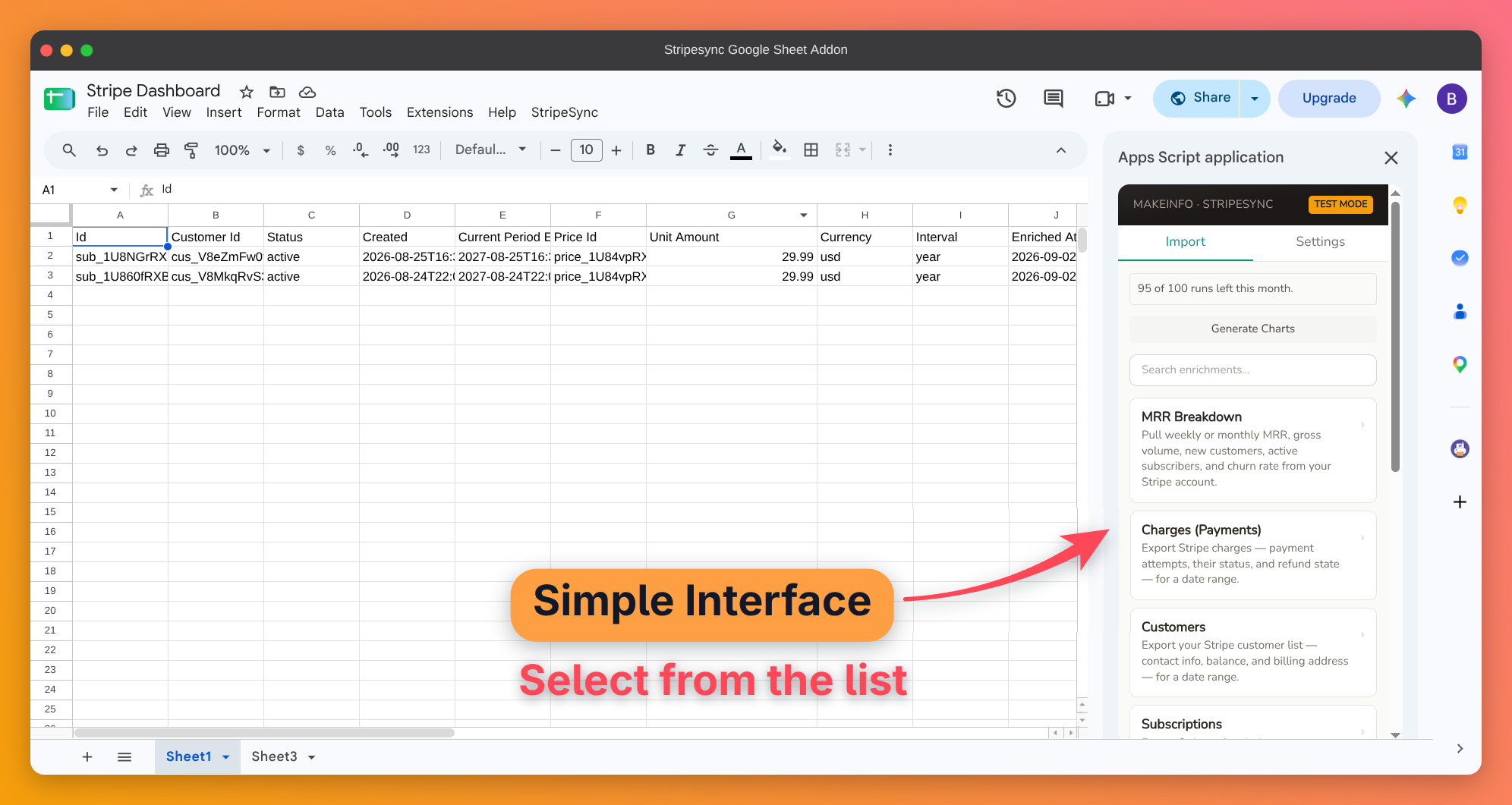
Pick a job, then set your range
Choose from 8 jobs: MRR Breakdown, Charges, Customers, Subscriptions, Payouts, Refunds, Disputes, or Products & Prices. MRR Breakdown groups by Week or Month (up to 104 periods). Every other job takes a simple Start/End date range. Then click Import Stripe Data.
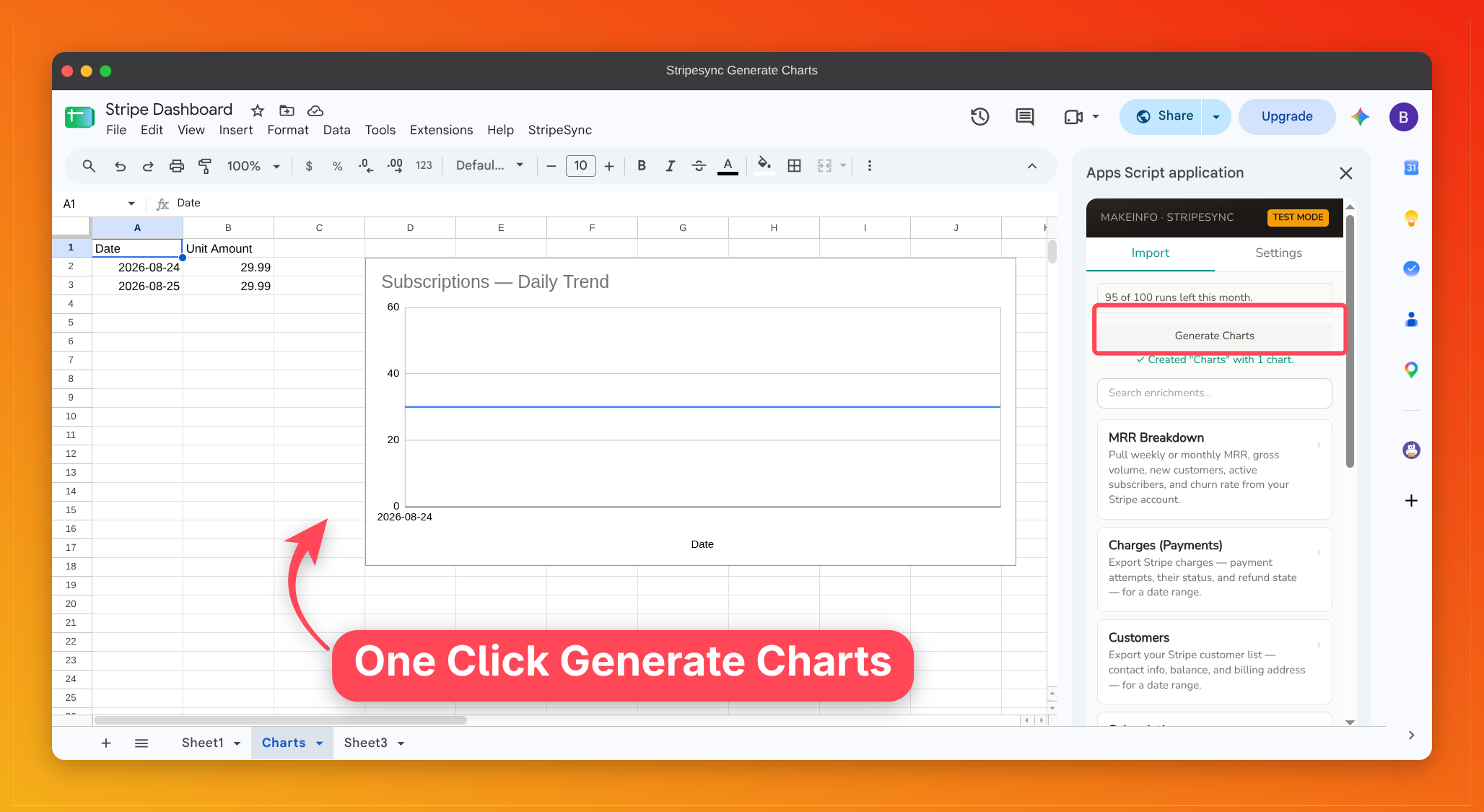
Generate native charts in one click
Once your rows land, click Generate Charts. MRR Breakdown gets a combo chart (MRR, volume, customers, subscribers) plus a churn-rate line chart. Every other job gets an automatic day-bucketed trend chart, right in your sheet.
See it in action
The real sidebar, not a mockup. This is exactly what you'll see in your own Google Sheet.
Step 1: Connect your Stripe key
Everything you need, already in your spreadsheet
No new dashboard to learn. No credits to buy from us.
8 Stripe exports, not just MRR
One add-on, eight jobs
- • MRR Breakdown, Charges, Customers, Subscriptions, Payouts, Refunds, Disputes, and Products & Prices
- • Each job runs on its own, so pull only what you need
- • MRR Breakdown groups by week or month, and every other job takes a Start/End date range
One-click native Sheets charts
No manual chart-building
- • MRR Breakdown gets a combo chart plus a churn-rate line chart
- • Every other job gets an automatic day-bucketed trend chart
- • Built from whatever's on your active sheet, any time
Advanced prompts to get insights
Point your own AI at the sheet
- • Ready-to-paste prompts tailored to each job's columns
- • Works with Gemini in Sheets, ChatGPT, or Claude
- • We never read or send your row data, just column names
Bring your own read-only Stripe key
Your account, your data
- • Restricted key only. We never accept a full secret key
- • Key stored in your spreadsheet, not on our servers
- • Test Mode keeps sandbox data separate from live
No backend, no middleman
Runs entirely in your browser
- • Your sheet talks directly to Stripe's API
- • Nothing routed through our servers
- • Nothing for us to see or store
Built for Google Sheets
A sidebar, not another tab
- • Native Sheets UI, no external dashboard
- • Re-run anytime. New rows append below existing data
- • Contact Us / Help built into the menu
Free to start. Upgrade for more runs.
Stripesync for Sheets calls your own Stripe account directly, with no markup either way. Upgrade only when 20 runs a month isn't enough.
Instant access · Works with any Google account
Activate your license key from the Settings tab after purchase
Comparing this against a Stripe importer?
An importer writes every transaction as a row. Stripesync for Sheets writes weekly MRR and churn instead.
Here's what teams got back after switching
Less time rebuilding reports, more time acting on the numbers.
Sam K.
Founder
"I used to rebuild our MRR sheet from a Stripe CSV every Monday morning. Now I just click Import and Generate Charts."
Elena V.
Head of Ops
"We needed weekly churn without paying for a BI tool. This add-on gets us there in about a minute."
Chris T.
Finance Lead
"I finally get my Stripe transactions into Google Sheets without the hassle of manual CSV exports. Big thanks to the developer. Really appreciate the work that went into this."
* Testimonials represent aspirational outcomes. Replace with real customer quotes when available.
What changes once Stripe fills the sheet
Three situations most teams recognize, before and after.
Weekly Revenue Reporting
Exporting Stripe CSVs, rebuilding MRR/churn formulas, and pasting results into last week's sheet.
Click Import Stripe Data, then Generate Charts. The sheet and charts update themselves.
Investor / Team Updates
Copying numbers out of a BI tool into a deck or email every update cycle.
Share the sheet directly. MRR, churn, and charts stay current with a re-run.
Sandbox Testing
No easy way to keep Stripe test-mode data separate from real revenue while building the sheet.
Test Mode checkbox and badge keep sandbox imports visually distinct from live data.
Small, specific wins
Real workflows this add-on replaces.
Founder replaced a Monday-morning CSV-export-and-formula ritual with a two-click Import + Generate Charts run.
FounderOps lead dropped a paid BI subscription in favor of native Sheets charts built straight from Stripe data.
Ops LeadFinance team gets weekly MRR and churn numbers without adding another line item to the software budget.
Finance* Figures are illustrative outcomes based on the workflow this add-on replaces, not measured customer data.
Your Stripe data is already there.
You just need it in a sheet.
Your revenue numbers already exist in Stripe.
They're just locked behind a CSV export and a formula you've rebuilt a dozen times.
Stripesync for Sheets pulls MRR, gross volume, new customers, active subscribers, and churn straight into your sheet, then charts them for you. No backend, no dashboard subscription, no middleman.
Free to install. Your own API key. No markup, no middleman.
Your MRR, churn, and charts, right inside Google Sheets
About This Add-on & Data Usage
Stripesync for Sheets is a Google Sheets add-on that imports weekly or monthly MRR, gross volume, new customers, active subscribers, and churn rate from your Stripe account, and can generate native charts from that data. You connect your own Stripe key, choose your import settings, and the add-on calls Stripe's API directly from your browser and writes results back to your sheet, with no backend in between.
Google Sheets: Read & Write
The add-on reads the granularity, period count, and output columns you choose, then writes weekly-or-monthly metric rows back to your sheet, plus any charts you generate. It only accesses the active spreadsheet, never any other files in your Drive.
Your Stripe Key: Read-Only, Stored in Your Spreadsheet
Stripesync for Sheets only accepts a Stripe restricted key scoped to read-only access. It rejects a full secret key outright, so it can never write, refund, or charge anything in your Stripe account. Your key is stored in your spreadsheet's user properties, not on our servers, and used only to call the Stripe API on your behalf.
What We Do Not Access
We do not access your Gmail, Google Drive files, Google Contacts, calendar, or personal account information. We do not store, sell, or share your Stripe data. The add-on runs entirely client-side, with no backend of ours in the loop.
Third-Party Data Provider
Your Stripe API key is used to call Stripe's own API directly from your browser, solely to retrieve the customers, subscriptions, and charges needed to compute your metrics. Stripe's own privacy policy governs how they handle that data.
Developer
Stripesync for Sheets is built and maintained by Makeinfo. This page is publicly viewable, no login is required to read it, and lives on a domain we own and control at makeinfo.co.
Just want the raw transactions, not MRR and churn?
Grab our free Google Apps Script — paste it into any Sheet, add your own restricted Stripe key, and it pulls every charge from the trailing months. No install, no account, nothing to buy.
Why we actually build these tools
If we're honest, it comes down to privacy. We're a small team, not a venture-backed company with a dedicated security department, and every tool we ship starts from the same question: would we hand our own data to this? If the answer's no, we don't build it that way. That's the real reason half of what's on this site exists — not because a security badge looks good on a landing page, but because we didn't want to be the company someone else has to worry about.
Read our privacy policy →